WordPress vs Blogger: Which Platform Should You Choose in 2026?
Compare WordPress vs Blogger with detailed features, pros, cons, pricing, SEO, and performance to choose the best platform for your website.
If you want to start a website today, there is a good chance you will end up comparing two names first: WordPress and Blogger.
At first glance, both seem similar.
You create content, publish pages, and manage everything online.
But once you start building seriously, the differences become much bigger than most beginners expect.
One platform gives simplicity.
The other gives freedom.
So which one should you choose?
Let us compare them properly.
Quick Overview
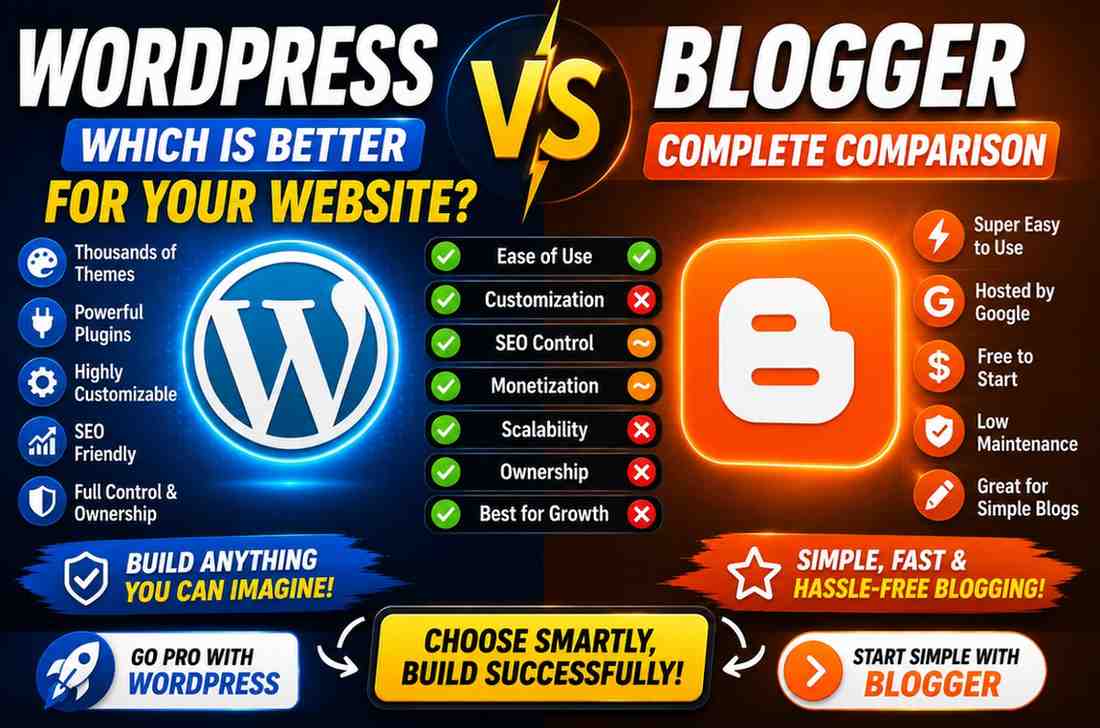
| Feature | WordPress | Blogger |
|---|---|---|
| Ownership | Full control | Controlled by Google |
| Ease of Use | Easy | Very Easy |
| Customization | Excellent | Limited |
| Themes | Thousands | Limited |
| Plugins | Huge ecosystem | Very limited |
| SEO Control | Strong | Basic |
| Scalability | Excellent | Limited |
| Monetization | Flexible | Moderate |
| Maintenance | Required | Minimal |
| Best For | Serious websites | Simple blogging |
If you already know you want to build something long term, this table already tells most of the story.
What Is WordPress?
WordPress is a website building platform that allows you to create almost any kind of website.
You can build:
• Blogs
• Portfolio websites
• Business websites
• Educational portals
• Ecommerce stores
• Membership websites
• Web applications
The biggest advantage of WordPress is flexibility.
You decide how your website looks and works.
Learn more about Wordpress : What Is WordPress and How to Make a Website on WordPress? Complete Beginner’s Guide
What Is Blogger?
Blogger is Google's blogging platform.
It was created mainly for publishing content quickly without worrying about technical setup.
You sign in.
Create a blog.
Start publishing.
That simplicity is its biggest strength.
But also one of its biggest limitations.
Ease of Use: Which Is Easier?
For absolute beginners, Blogger wins.
You can create a blog in minutes.
No hosting.
No installation.
No updates.
WordPress takes a little more effort because you need hosting and setup.
But once installed, managing WordPress becomes very comfortable.
Winner: Blogger (for beginners)
Design and Customization
This is where the gap becomes obvious.
With Blogger, you can change layouts and make some visual adjustments.
With WordPress, you can practically redesign everything.
Header.
Footer.
Page structure.
Animations.
Custom sections.
Entire functionality.
If design matters to you, WordPress moves far ahead.
Winner: WordPress
Feature Comparison
| Area | WordPress | Blogger |
|---|---|---|
| Drag and drop builders | Yes | No |
| Membership system | Yes | No |
| Ecommerce support | Excellent | Weak |
| Custom forms | Yes | Limited |
| Database access | Yes | No |
| App like experience | Possible | Limited |
If your website idea may evolve later, WordPress gives far more room.
SEO: Which Performs Better?
This is where many people misunderstand things.
Blogger belongs to Google.
That does not mean Blogger automatically ranks better.
SEO depends mostly on:
• Content quality
• Site speed
• Structure
• User experience
WordPress simply gives more control.
You can manage URLs, metadata, redirects, sitemaps, schema, performance, and more.
Winner: WordPress
Cost Comparison
| Cost Area | WordPress | Blogger |
|---|---|---|
| Platform | Free | Free |
| Hosting | Usually Paid | Included |
| Domain | Optional | Optional |
| Premium Features | Optional | Limited |
Blogger usually starts cheaper.
WordPress becomes more valuable long term.
Winner: Blogger (short term)
Ownership and Long Term Control
This is probably the most important section.
With Blogger, your platform depends on Google.
With WordPress, your website belongs to you.
You choose:
• Hosting
• Backup strategy
• Features
• Monetization
• Migration options
If building a serious brand matters to you, ownership becomes important.
Winner: WordPress
Security and Maintenance
Blogger feels easier because Google handles most maintenance.
WordPress needs updates and security management.
But that extra responsibility also comes with more freedom.
Winner:
Blogger for convenience
WordPress for control
So Which One Should You Choose?
Choose Blogger if:
✓ You want a simple blog
✓ You do not want maintenance
✓ You want to start immediately
Choose WordPress if:
✓ You want a professional website
✓ You care about design
✓ You want future growth
✓ You want full ownership
✓ You may expand later
My Recommendation
If your goal is learning, blogging casually, or testing ideas, Blogger is still useful.
But if you are building something that you want to grow over time, WordPress gives more possibilities.
Most people who stay serious about websites eventually move toward WordPress because they stop thinking only about publishing and start thinking about building experiences.
FAQ
Is Blogger completely free?
Yes. You can start without paying.
Is WordPress better than Blogger?
For flexibility and growth, yes.
Which is better for SEO?
WordPress usually gives more control.
Can I move from Blogger to WordPress later?
Yes. Migration is possible.
Which platform is easier?
Blogger is easier initially.
Which platform is better for portfolio websites?
WordPress is generally the stronger choice.